Participant guide — everything you need to know before arriving at PICC
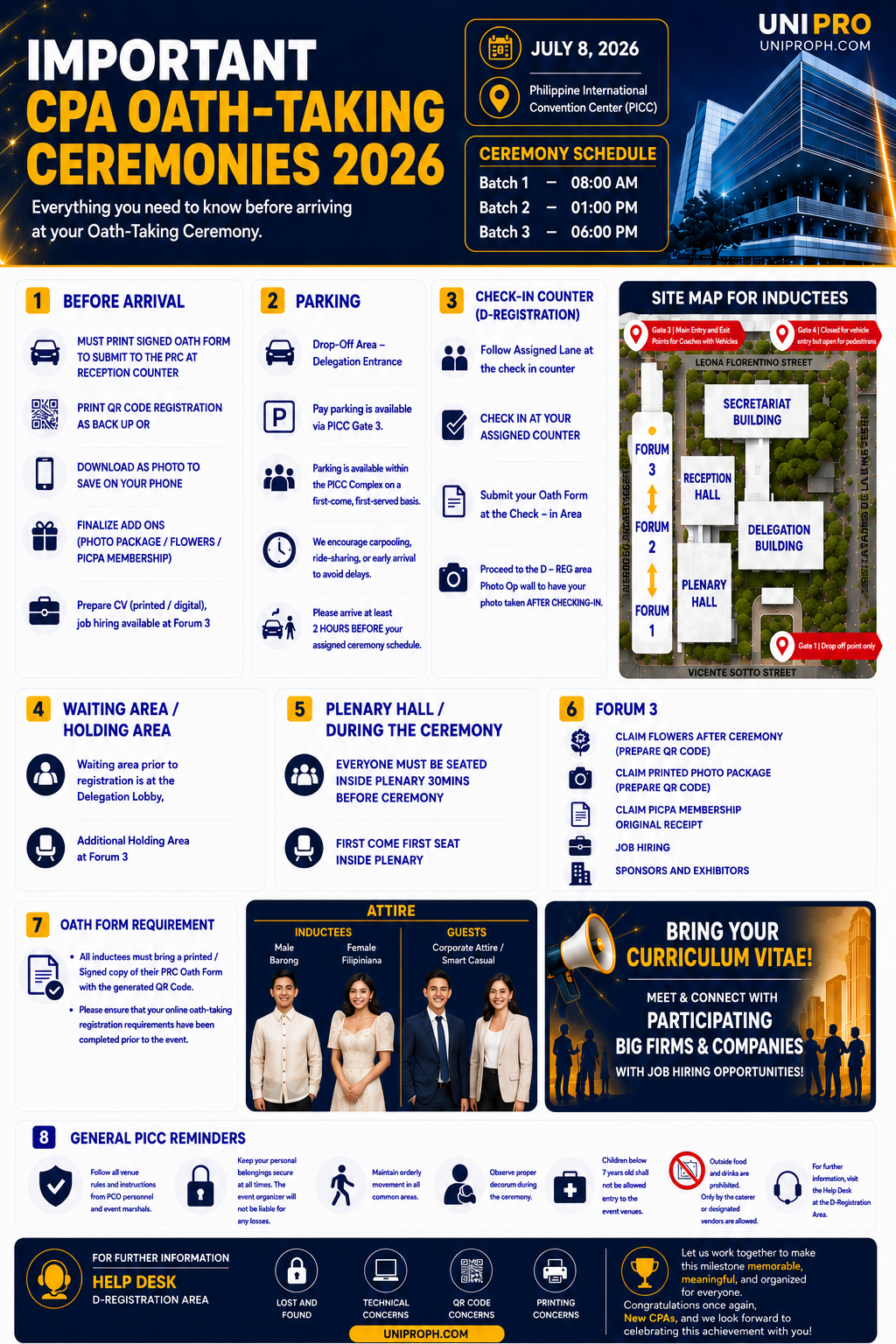
CPA Oath-Taking Ceremonies 2026
| Date | July 8, 2026 |
| Venue | Philippine International Convention Center (PICC) |
| Batch 1 | 8:00 AM |
| Batch 2 | 1:00 PM |
| Batch 3 | 6:00 PM |
1. Before arrival
- Print your signed Oath Form to submit to the PRC at the reception counter
- Print your QR code registration as backup, or save a photo of it on your phone
- Finalize add-ons: photo package, flowers, PICPA membership
- Prepare your CV (printed or digital) — job hiring available at Forum 3
- Please ensure that your LERIS schedule is the same as your Oath-Taking schedule registered in UNI PRO
2. Parking
- Drop-off area is at the Delegation Entrance
- Paid parking available via PICC Gate 3, first-come first-served within the complex
- Carpooling, ride-sharing, or early arrival is encouraged
- Arrive at least 2 hours before your assigned ceremony schedule
3. Check-in counter (D-Registration / D-REG, Upper Lobby)
- Follow your assigned lane at the check-in counter for scanning of QR code
- Submit your Oath Form at the check-in area
- Those who availed the Photo Package check in through a dedicated lane — the D-REG photo op wall is located there and is exclusive to Photo Package holders
4. Waiting / holding area
- Main waiting area (before registration): Delegation Lobby
- Additional holding area: Forum 3
5. During the ceremony
Be seated inside Plenary Hall 30 minutes before the ceremony; seating is first come, first seat
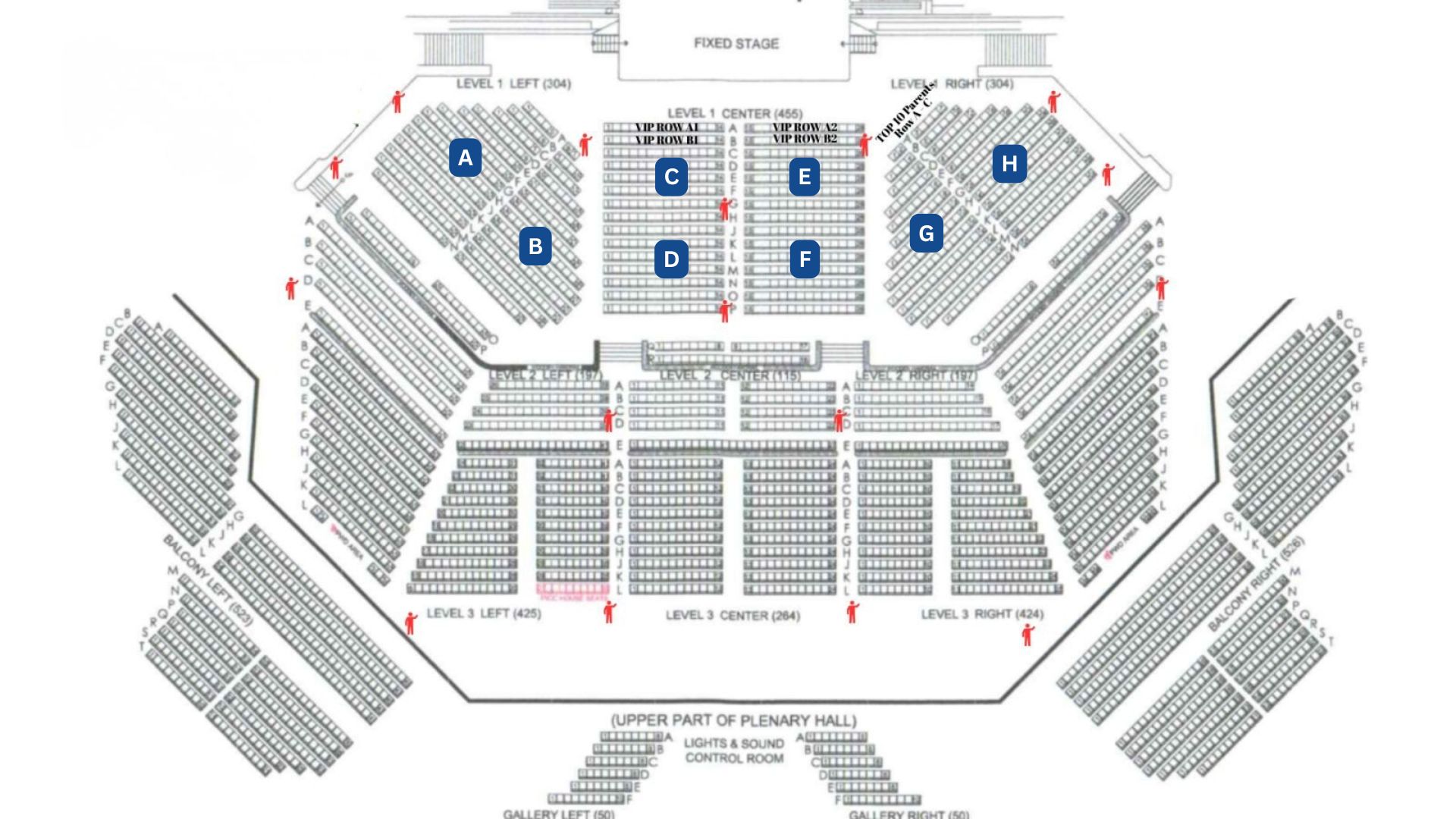
The middle section will be filled first — our ushers will guide you to your seat. Once seated, you can no longer switch sections
The Plenary Hall is divided into sections — there's no assigned section, so take note of wherever you end up sitting (e.g. Section C), as that's the same marker you'll look for later when claiming your photo at Forum 3
Our photographers will take your photo during the ceremony, including a digital shot for everyone — upload a selfie under "My Ticket" on the day so we can tag it to your account (only those who availed the Digital Photo will be able to download it)
6. Photo services
Roving photographer
- Approach the roving photographer anytime if you'd like a photo with your family
- They'll hand you a stub after the photo
- Pay for it at the Helpdesk in Forum 3 after the ceremony
- Once paid, proceed to the Photo Claiming Area to get your prints
Digital photos
- Expect your digital photos within 7 days
7. Forum 3 — after the ceremony
- A photo wall is available here for everyone to use, free of charge
- Claim flowers after ceremony (prepare QR code)
- Claiming of photos:
- Photo Package holders: proceed to the Photo Claiming Area and look for your assigned section (A, B, C, etc.); your QR code will be scanned upon entry
- Roving photographer photos: pay at the Helpdesk using your stub, then proceed to the Photo Claiming Area to get your prints
- Digital photos: only available for download to those who availed the Digital Photo Package, within 7 days
- Claim PICPA membership — bring original receipt
- Job hiring booths, sponsors and exhibitors
8. Oath form requirement
- Bring a printed, signed copy of your PRC Oath Form with the generated QR code
- Complete your online oath-taking registration requirements before the event
9. Attire
| Who | Attire |
|---|---|
| Male inductee | Barong |
| Female inductee | Filipiniana |
| Guests | Corporate attire / smart casual |
Bring your CV — meet and connect with participating big firms and companies offering job hiring opportunities.
10. General PICC reminders
- Follow venue rules and instructions from PCO personnel and event marshals; keep personal belongings secure — the organizer is not liable for losses
- Maintain orderly movement and decorum; children below 7 not allowed entry
- Outside food and drinks are prohibited (caterer/designated vendors only)
11. Help desk (D-Registration area)
For assistance with: lost and found, technical concerns, QR code concerns, printing concerns. Website: uniproph.com
Congratulations, New CPAs! Let's work together to make this milestone memorable, meaningful, and organized for everyone.